Showing posts with label reset. Show all posts
Showing posts with label reset. Show all posts
Thursday, March 7, 2013
LaserJet 1522 mfp Cold reset
Network configuration (please wait at least five minutes after cold reset!)
Press Setup button
Use arrow keys to highlight Reports, then press OK
Use arrow keys to highlight Network Report, then press OK
ReadMore
Press Setup button
Use arrow keys to highlight Reports, then press OK
Use arrow keys to highlight Network Report, then press OK

Friday, March 1, 2013
Samsung SCX Errors and Reset
Samsung SCX series printers (SCX-4521, SCX-5530, SCX-6220, SCX-6320, SCX-6322) are piece of office equipments for use at home or in small business. These space-saving All-in-One printers provide high quality laser printing, high color digital scanning, copying and faxing.
User can press “Menu” key on display to go through the menus and choices. There are many that are useful to the technicians. You can set the machine to continue copying if toner empty or to stop if toner empty. If you wish it to continue, go to “ignore toner empty” and set it to “ON”. Density, paper feed, power save, etc are also adjusted here. Go to “Reports” and then to “billing/Counters” for total count. You can also print out a report which will tell you all of the user choices and what their current setting is, which probably includes total count also.
SCX 5530 Drum Reset:
After replacing the drum with a new one, press “Menu” and then press up/down keys until “New Drum” displays. Then press “Mode/enter”. When you see “New drum unit?” press “1” to select yes and to reset the drum count.
Error Messages:
- Authentication failed: Wrong password
- Comm Error, Connection Error: Fax line error problem
- Data read/check USB: Time expired,; try again
- Data write/ check USB: Inadequate memory
- Door open: Front or rear cover open.
- Enter again: Keystroke error
- File access denied: Change server settings
- File Name exist: Change file name
- File name over limit: Delete some files
- Fuser open
- Incompatible: Problem with machine you are communicating with.
- Low heat error: Off and On or fuser problem
- LSU motor: Laser polygon motor problem
Wednesday, February 27, 2013
Canon Printer Waste Tank Reset
CanonGENERIC "S"SERIES RESET CODE
(1) Turn off the printer.
(2) Press and hold the RESUME button, then press and hold the POWERbutton.
(3) Release the RESUME button, Next press and release the RESUME button two (2) more times in succession. Note: you are still holding the POWER button). The printers carriage will "reset"
or move momentarily. If the above was properly performed the printer will enter the"Service Mode".
(4) Press the RESUME button 4 times, this will select the clear waste ink counter function. The lamp
will alternate (change) color with each key press.
1. Service/Factory test print out, including ink sensor check.
2. EEPROM - Info printout.
3. EEPROM - Initialization.
4. Reset the Waste ink counter.
5. Printer model setting. (More selections beyond this point - However it is best leave them unaltered - You have been warned!)
After selecting the desired mode (eg 4), press the POWER button to"set" the change, and return to the top of the function selection menu. Press the POWER button again to restart the printer.
ReadMore
(1) Turn off the printer.
(2) Press and hold the RESUME button, then press and hold the POWERbutton.
(3) Release the RESUME button, Next press and release the RESUME button two (2) more times in succession. Note: you are still holding the POWER button). The printers carriage will "reset"
or move momentarily. If the above was properly performed the printer will enter the"Service Mode".
(4) Press the RESUME button 4 times, this will select the clear waste ink counter function. The lamp
will alternate (change) color with each key press.
1. Service/Factory test print out, including ink sensor check.
2. EEPROM - Info printout.
3. EEPROM - Initialization.
4. Reset the Waste ink counter.
5. Printer model setting. (More selections beyond this point - However it is best leave them unaltered - You have been warned!)
After selecting the desired mode (eg 4), press the POWER button to"set" the change, and return to the top of the function selection menu. Press the POWER button again to restart the printer.
Tuesday, February 26, 2013
Service tool for reset canon i320
This is Reseter for reset i320
Service tool you can download at
http://www.divshare.com/download/1246525-8dc
if you like it please give me some coment
good luck friend.
ReadMore
Service tool you can download at
http://www.divshare.com/download/1246525-8dc
if you like it please give me some coment
good luck friend.
Monday, February 25, 2013
How to Reset Printers Canon MP Series
How to Reset Printers Canon MP140, MP160, MP180, MP210, MP220, MP460, MP470, MP500, MP510, MP530, MP600, MP610, MP800, MP820, MP810, MP830, MP960, MP970
ReadMore
- Start with printer off
- Press and hold resume Button (triangle in the circle) and click “Power” button. green led should be on
- While holding the Power button, release the Resume Button.
- Without releasing the Power Button, click “Resume” button for two times and release Both Buttons.
- Click “Resume” for four times then soon click “Power” button, to confirm the selected action (reset counter absorber).
- Turn off the printer and turn on again
Sunday, February 24, 2013
How to Reset Epson T13 and ME32 printer

Please follow the steps below to reset the protection counter effectively.
1. Double click Adjprog.exe.
2. Click “Accept” button.
3. Click "Select" button. and choose your printer model then click "OK"
4. Click “Particular adjustment mode” button.
5. Select on “Waste ink pad counter” and click “OK” button.
6. Check on Main pad counter and click on “Initialization” button and the program will reset the protection counter.
7. Turn off the printer as a program instructed then turn on again.
8. Click “Finish” button. and its done!
Here the screenshot of software resetter Epson T13, T1100 and TX121


Downloads
Friday, February 22, 2013
CANON IP8500 WASTE TANK FULL RESET CODE
First thing you need to do is print an EEPROM information page, step number 2 below.
Once you have an EEPROM print you can reset the waste ink counter, if needed, which is step number 4 below.
Service Mode: This printer has a service mode for service-related settings and for performing test prints. The operator panel buttons are used to enter the desired service mode.
Service Mode Operations
With the printer powered off, hold down the resume button and press the power button.
While holding down the power button, release the resume button and press the resume button twice in succession. Now release the power button.
The indicator will blink in green and remain lit in green.
Select one of the following service mode functions by pressing the “RESUME Button” the specified number of times.
1 time = Service test print.
2 times = EEPROM information print.
3 times = EEPROM initialization
4 times = Waste ink counter resetting
5 times = Destination settings
6 times = Print head deep cleaning
Then press the “Power Button” one time to perform the function just selected.
ReadMore
Once you have an EEPROM print you can reset the waste ink counter, if needed, which is step number 4 below.
Service Mode: This printer has a service mode for service-related settings and for performing test prints. The operator panel buttons are used to enter the desired service mode.
Service Mode Operations
With the printer powered off, hold down the resume button and press the power button.
While holding down the power button, release the resume button and press the resume button twice in succession. Now release the power button.
The indicator will blink in green and remain lit in green.
Select one of the following service mode functions by pressing the “RESUME Button” the specified number of times.
1 time = Service test print.
2 times = EEPROM information print.
3 times = EEPROM initialization
4 times = Waste ink counter resetting
5 times = Destination settings
6 times = Print head deep cleaning
Then press the “Power Button” one time to perform the function just selected.
Thursday, February 21, 2013
To reset the HP C6657A 57 or HP C8728A 28
To reset the HP C6657A (#57) or HP C8728A (#28):
1. Refill your cartridge using your Mr. Ink Jet refill kit.
2. Following the diagram at right, place a piece of adhesive tape covering the only the blue colored contact (a contact is the individual copper square). Make sure that only that contact is covered and no others. *Please note that the contacts shown are colored for illustrative purposes only. You will not have blue or red contacts on your cartridge.
3. Place cartridge in the printer. The printer may tell you that there is a problem with your cartridge. Ignore this message. The printer may print an alignment page. If so, allow it to do so.
4. Take the cartridge out of the printer. Leave the tape from blue contact. Place another piece of tape over the red colored contact. Make sure that only that contact is covered and no others. *Please note that the contacts shown are colored for illustrative purposes only. You will not have blue or red contacts on your cartridge.
5. Follow step 3 again.
6. Take the cartridge out of the printer for the final time. Take the remaining tape off and place back in the printer. The printer should print out an alignment page and the estimated ink level in the toolbox should read full.
Reset Method 2:
If Reset Method 1 did not work on your printer, you can cycle cartridges through to reset the level. You will need two extra cartridges and the one you refilled. First, put the refilled cartridge in the printer. Allow it to recognize the cartridge and print an alignment page. Take that cartridge out and place in the first extra cartridge. Allow it to recognize and print an alignment page. Take the first extra cartridge out and place the second extra cartridge in. Allow it to recognize and print an alignment page. Take the second extra cartridge out. Place the refilled cartridge back in the printer. It will print an alignment page and then the estimated ink level will be reset to full.
ReadMore
1. Refill your cartridge using your Mr. Ink Jet refill kit.
2. Following the diagram at right, place a piece of adhesive tape covering the only the blue colored contact (a contact is the individual copper square). Make sure that only that contact is covered and no others. *Please note that the contacts shown are colored for illustrative purposes only. You will not have blue or red contacts on your cartridge.
3. Place cartridge in the printer. The printer may tell you that there is a problem with your cartridge. Ignore this message. The printer may print an alignment page. If so, allow it to do so.
4. Take the cartridge out of the printer. Leave the tape from blue contact. Place another piece of tape over the red colored contact. Make sure that only that contact is covered and no others. *Please note that the contacts shown are colored for illustrative purposes only. You will not have blue or red contacts on your cartridge.
5. Follow step 3 again.
6. Take the cartridge out of the printer for the final time. Take the remaining tape off and place back in the printer. The printer should print out an alignment page and the estimated ink level in the toolbox should read full.
Reset Method 2:
If Reset Method 1 did not work on your printer, you can cycle cartridges through to reset the level. You will need two extra cartridges and the one you refilled. First, put the refilled cartridge in the printer. Allow it to recognize the cartridge and print an alignment page. Take that cartridge out and place in the first extra cartridge. Allow it to recognize and print an alignment page. Take the first extra cartridge out and place the second extra cartridge in. Allow it to recognize and print an alignment page. Take the second extra cartridge out. Place the refilled cartridge back in the printer. It will print an alignment page and then the estimated ink level will be reset to full.
Reset Waste Ink Canon IP1500
Step 1 Manual for Service mode to reset waste ink or blinking canon ip1500
1. Unplug power and USB.
2. Open door and hold power button.
3. Connect power.
4. Close door, then release power button.
Step 2 Use software for Permanent to reset waste ink
download tool to reset permanent waste ink.
this resetter printer Canon IP 1500. This tool can reset waste ink for canon ip1500 permanent
User guide:
1.
Unzip downloaded file.
2.
Run GeneralTool.exe
3.
Select the connected USB port number from USB port
4.
Click LOCK RELEASE, and select the applicable model name in SET DESTINATION
5.
In CLEAR WASTE INK COUNTER, select MAIN or PLATEN. The selected waste ink counter will be reset. MAIN resets the main waste ink counter, PLATEN resets the platen waste ink counter.
If both the main and platen waste ink absorbers are replaced, reset both the main and platen waste ink counters.
http://www.savefile.com/files/1039880
http://soulved.blogspot.com
ReadMore
1. Unplug power and USB.
2. Open door and hold power button.
3. Connect power.
4. Close door, then release power button.
Step 2 Use software for Permanent to reset waste ink
download tool to reset permanent waste ink.
this resetter printer Canon IP 1500. This tool can reset waste ink for canon ip1500 permanent
User guide:
1.
Unzip downloaded file.
2.
Run GeneralTool.exe
3.
Select the connected USB port number from USB port
4.
Click LOCK RELEASE, and select the applicable model name in SET DESTINATION
5.
In CLEAR WASTE INK COUNTER, select MAIN or PLATEN. The selected waste ink counter will be reset. MAIN resets the main waste ink counter, PLATEN resets the platen waste ink counter.
If both the main and platen waste ink absorbers are replaced, reset both the main and platen waste ink counters.
http://www.savefile.com/files/1039880
http://soulved.blogspot.com
Reset Printers Canon MP140 MP160 MP180
Beneath recitation set methods for Machine Ravine MP140, MP160 and MP180
1. Turn with printer off
2. Counsel and break uphold Fix (trilateral in the shape) and depression "Power" fix. green led should be on
3. Spell retentive the State switch, conclusion the Resume Switch.
4. Without releasing the Land Fasten, clink "Resume" fix for two times and discharge Both Buttons.
5. Stop "Resume" for foursome present then presently plosive "Power" add, to confirm the elect activeness (adjust calculator absorber).
6. Turning off the printer and transport on again
ReadMore
1. Turn with printer off
2. Counsel and break uphold Fix (trilateral in the shape) and depression "Power" fix. green led should be on
3. Spell retentive the State switch, conclusion the Resume Switch.
4. Without releasing the Land Fasten, clink "Resume" fix for two times and discharge Both Buttons.
5. Stop "Resume" for foursome present then presently plosive "Power" add, to confirm the elect activeness (adjust calculator absorber).
6. Turning off the printer and transport on again
Wednesday, February 20, 2013
How to Reset Canon i850 i950 Waste Ink
Follow the step below to to reset Canon i850, i950, Waste Ink
presses – light color – function
ReadMore
- Start with the printer OFF
- Hold down RESUME and then hold down POWER
- Release RESUME
- Press RESUME twice, then release POWER
- Let green light blink until printer is done futzing
presses – light color – function
| Number of presses | light color | function |
| 0 presses | green | Test print (or exit service mode on i960) |
| 1 press | orange | EEPROM info print (plus grid nozzle diagnostic on i960) |
| 2 presses | green | EEPROM initialize |
| 3 presses | orange | Reset waste ink counter |
Reset Epson Rx500
For those of you who have been unable to re-set your printers, no affair what, perhaps it is because the "run ink" counter has tripped and unopen everything kill, protection the printer up. If this is the circumstance, when you release on your RX500, the red warning palish comes on, service of the additional buttons lightheaded up and the LCD may scan "several printer parts hit reached the end of their tableware spiritedness to this difficulty was posted on this web computer on 11/10/06 by "tmullins" styled "epson rx500". It reads as follows:
Heres how to set the drain ink negative.
Pertain downwardly the "exculpated + Equipment + On" buttons until the printer powers on, then off, and play on again. Let go of the tercet buttons when the LCD door flashes a empty sift or contains a message that relic unflagging (mine record Text ENDURANCE). Pierce the paw SELECT fasten until "Rst. Ink OFC" shows on the LCD occlude. Mould the Ornament Enfeeble Ink Furniture is reset.
Dont block to unspotted or exchange the sopping enfeeble ink sponges.
Suchlike so umpteen of you, I was frustrated with this problem and was fit to go out and buy a new printer, but something told me to identify "Epson RX500 Repairs" in the seek bar and see, the premier occupation I saw on this web tract dealt with the unvaried job I had.
I followed the above described steps and "whop" my printer is working decent again. I fully believe why Epson calls this a Dissipation Ink Sideboard. If you run a Spout Examine, of education, ink is utilized to produce a activity chequer for all six colours. If one of the patterns is imperfect, a Lead Cleansing machine will use ink to unclog the stilted coil. The job is that the remaining fin heads are also cleaned flatbottom though they didnt require it (wasted ink). If you exchange a pickup, it is Effervescent by using its ink to superior the pickup. The job is that not only is the new cartridge Hot, but the remaining five cartridges are charged as steady tho they didnt pauperism it (statesman wasted ink).
I bought my Epson RX500 when they initial came out so Ive had it for a few years now and it has served me advisable all this abstraction until this "mysterious" position came up. By the way, erst the OEM cartridges ran out of ink, I directly started using matched inks from either www.123inkjets or www.all-ink with fantabulous results at a reckon of the outrageous toll of OEM cartridges. If you use aftermarket inks, be careful you are getting Dye supported ink, not Pigmented ink, because the Epson RX500 is falsehood to use Dye based ink and if you controller between Dye and Pigmented inks, you can end up with a overserious mussiness on your safekeeping. By the way. I also bought a Fleck Resetter that allows me to set the divide on a supposedly vacuous cartridge which makes the machine cerebrate a new cartridge has been installed.
I human gotten as some as two other weeks of printing out of a so-called lifeless much Im learning some the orphic steps requisite to cook this printer working, and almost all the "ink" problems associated with this organisation, the many fully I interpret why Epson forfeited a class-action match filed against them over their "ink".
I prospect this give be cooperative for any of you who are at your intelligence end.
ReadMore
Heres how to set the drain ink negative.
Pertain downwardly the "exculpated + Equipment + On" buttons until the printer powers on, then off, and play on again. Let go of the tercet buttons when the LCD door flashes a empty sift or contains a message that relic unflagging (mine record Text ENDURANCE). Pierce the paw SELECT fasten until "Rst. Ink OFC" shows on the LCD occlude. Mould the Ornament Enfeeble Ink Furniture is reset.
Dont block to unspotted or exchange the sopping enfeeble ink sponges.
Suchlike so umpteen of you, I was frustrated with this problem and was fit to go out and buy a new printer, but something told me to identify "Epson RX500 Repairs" in the seek bar and see, the premier occupation I saw on this web tract dealt with the unvaried job I had.
I followed the above described steps and "whop" my printer is working decent again. I fully believe why Epson calls this a Dissipation Ink Sideboard. If you run a Spout Examine, of education, ink is utilized to produce a activity chequer for all six colours. If one of the patterns is imperfect, a Lead Cleansing machine will use ink to unclog the stilted coil. The job is that the remaining fin heads are also cleaned flatbottom though they didnt require it (wasted ink). If you exchange a pickup, it is Effervescent by using its ink to superior the pickup. The job is that not only is the new cartridge Hot, but the remaining five cartridges are charged as steady tho they didnt pauperism it (statesman wasted ink).
I bought my Epson RX500 when they initial came out so Ive had it for a few years now and it has served me advisable all this abstraction until this "mysterious" position came up. By the way, erst the OEM cartridges ran out of ink, I directly started using matched inks from either www.123inkjets or www.all-ink with fantabulous results at a reckon of the outrageous toll of OEM cartridges. If you use aftermarket inks, be careful you are getting Dye supported ink, not Pigmented ink, because the Epson RX500 is falsehood to use Dye based ink and if you controller between Dye and Pigmented inks, you can end up with a overserious mussiness on your safekeeping. By the way. I also bought a Fleck Resetter that allows me to set the divide on a supposedly vacuous cartridge which makes the machine cerebrate a new cartridge has been installed.
I human gotten as some as two other weeks of printing out of a so-called lifeless much Im learning some the orphic steps requisite to cook this printer working, and almost all the "ink" problems associated with this organisation, the many fully I interpret why Epson forfeited a class-action match filed against them over their "ink".
I prospect this give be cooperative for any of you who are at your intelligence end.
Tuesday, February 19, 2013
Canon Printers reset with Software Resetter
Mostly, Ravine resetter programs change twin resetting work except for any models. So that fortunate resetting canon printers using writer ride all enter attributes of software resetter should not be feature exclusive and dont run the software from CD. There are two variation of pervading way for ravine printer that is with enclosure announcement add and do not jazz Interlace Activity fix.
For resetter with Embrace Give secure (launch internal the possible file)
1. Run generaltool.exe or the application or executable file.
2. Select USB port of the printer to be reset.
3. Click lock release button.
4. IN Select Destination option, select the printer model.
5. In Test Print option, select EEPROM clear.
6. Prepare a paper and then click test pattern 1 under Test Print option.
7. Turn off the printer and turn on again.
For resetter which do not have Lock Release button
Run generaltool.exe or the program or workable line.
Select USB side of the printer to be set.
In Select Destination deciding, superior the printer mold.
In Try Create deciding, superior EEPROM unobstructed.
Modify a theme and then stop endeavour ornament 1 under Judge Exposure option.
windup it
ReadMore
For resetter with Embrace Give secure (launch internal the possible file)
1. Run generaltool.exe or the application or executable file.
2. Select USB port of the printer to be reset.
3. Click lock release button.
4. IN Select Destination option, select the printer model.
5. In Test Print option, select EEPROM clear.
6. Prepare a paper and then click test pattern 1 under Test Print option.
7. Turn off the printer and turn on again.
For resetter which do not have Lock Release button
Run generaltool.exe or the program or workable line.
Select USB side of the printer to be set.
In Select Destination deciding, superior the printer mold.
In Try Create deciding, superior EEPROM unobstructed.
Modify a theme and then stop endeavour ornament 1 under Judge Exposure option.
windup it
How to Reset canon i320
Reset canon i320.! Ints easy you is only requiring two steps, that is reset manual for service mode and reset using software resetter for permanent reset.
Following this steps to reset printer canon i320
Step 1 : Reset Manual for service mode
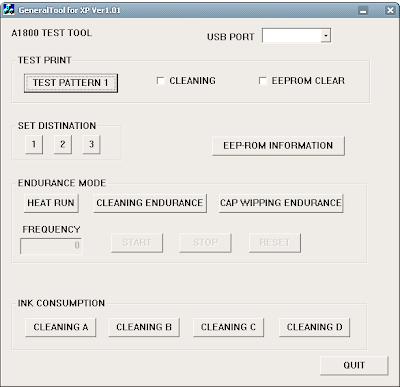
Step 2 : reset using Software resetter i320 for Permanent reset
ReadMore
Following this steps to reset printer canon i320
Step 1 : Reset Manual for service mode
- Discharging all cables (power cable and USB cable ) at the printer
- Open front cover of printer and then press and hold the power button.
- While holed power button, Connect the power cable to power source .
- Close printer cover, then release power button.

Step 2 : reset using Software resetter i320 for Permanent reset
- Download software resetter for canon i320. After finishing download the file, extrac this file by click i320.exe file.
- Now Reconnect the USB printer cable to computer.
- Run General Tools software resetter for Canon printers i320 by clicking generaltool.exe file
- Select where your printer installed in the USB PORT
- Choose SET DESTINATION 1 to reset the printer and the printer should be reset.
Monday, February 18, 2013
Reset Canon MP360
The Ravine MultiPASS MP360 Screen Ikon Machine Copier and Detector delivers surpassing show and versatility to the bag power. Print postgraduate wellborn schoolbook and photos quickly reduplicate documents and graphics and easily picture photos and added images all with one squeeze organization.
By using highschool degree stuff inks and soil based illegal ink the MultiPASS MP360 can process your spirit with publication and copying signal. It justified delivers borderless copies and photos, borderless prints perfect for framing or the scrapbook. Both scanning and copying propertied are reinforced with the use of CCD sort scanning profession and a maximum software enhanced finding of 9600 dpi with 48-bit modify depth. Exposure travel the Ravine MultiPASS MP360 up to 18 ppm in inglorious up to 12 ppm in Recitation Adjust Activity To reset emaciate ink containerful fault and correct fault encrypt 343
Exercise Correct activity Material Ink Cell for Canon MP390 and Ravine MP360 Virtuous Rise this support to set run ink cell high :
1. Line with printer on, mould aadditional functions, Picture, Double, Construe. Now you should be in coupling average.
2. Select Trial average which is suchlike the terminal purchasable selection
3. Select 8 Machine Essay, it will do something here similar improvement or something then it present get up with whatsoever added option this is where it gets a bit unclear cause now all it says is equivalent 8-2 or 8-3 propulsion the + or - add until it says 8-3 then hit the select fix
* The menu will now say EEPROM Overhaul
* Superior Ink estimate which is alternative (0) and machine set
* Then cast Stop/Reset Followed by the noesis button and then inactivity for it to uphold.
ReadMore
By using highschool degree stuff inks and soil based illegal ink the MultiPASS MP360 can process your spirit with publication and copying signal. It justified delivers borderless copies and photos, borderless prints perfect for framing or the scrapbook. Both scanning and copying propertied are reinforced with the use of CCD sort scanning profession and a maximum software enhanced finding of 9600 dpi with 48-bit modify depth. Exposure travel the Ravine MultiPASS MP360 up to 18 ppm in inglorious up to 12 ppm in Recitation Adjust Activity To reset emaciate ink containerful fault and correct fault encrypt 343
Exercise Correct activity Material Ink Cell for Canon MP390 and Ravine MP360 Virtuous Rise this support to set run ink cell high :
1. Line with printer on, mould aadditional functions, Picture, Double, Construe. Now you should be in coupling average.
2. Select Trial average which is suchlike the terminal purchasable selection
3. Select 8 Machine Essay, it will do something here similar improvement or something then it present get up with whatsoever added option this is where it gets a bit unclear cause now all it says is equivalent 8-2 or 8-3 propulsion the + or - add until it says 8-3 then hit the select fix
* The menu will now say EEPROM Overhaul
* Superior Ink estimate which is alternative (0) and machine set
* Then cast Stop/Reset Followed by the noesis button and then inactivity for it to uphold.
How to Reset Canon Pixma iP6000 iP8500
Manual Reset for Canon Pixma iP 6000, iP 8500
ReadMore
- Turn off the printer.
- Hold Resume button click POWER.
- Hold button RESUME release POWER.
- Then press the button RESUME again .
- Release all the buttons.
- Led Indicator in green and stay green.
- Click RESUME button 4 times , if you want to make another transaction. Look at the table below :
- Orange – Service test print 1 times – Orange – Service test print
- Green – EEPROM information print 2 times – Green – EEPROM information print
- Orange – EEPROM initialization 3 times – Orange – EEPROM initialization
- Green – Waste ink counter setting 4 time – Green – Waste ink counter setting
- Orange – Destination setting (Press Power > Press Resume 3x) 5 times – Orange – Destination setting (Press Power> Press Resume 3x)
- Green – Print head deep cleaning 6 times – Green – Print head deep cleaning
- Orange, Green, Orange – Return to menu selection 11-13 times – Orange, Green, Orange – Return to menu selection
- Green – Left margin correction 14 times – Green – Left margin correction
- Turn off the printer POWER button.
Sunday, February 17, 2013
How to Reset Canon Pixma MP520
Reset procedure for Canon Pixma MP520, posting by BilBg (bulgaria) in fixyourownprinter forum, procedure for resetting the Canon Pixma MP520 with button combinations. Some users in this forum which have tried this method (canon MP520 reset methode) say this method work on Canon MP520.
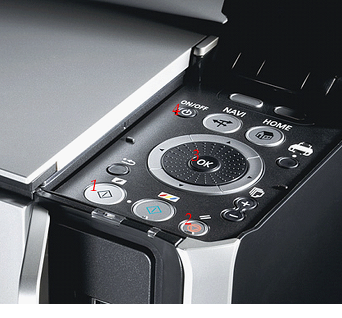
Here Procedure Resetting Canon Pixma MP520 (Picture by BilBg):
ReadMore
Here Procedure Resetting Canon Pixma MP520 (Picture by BilBg):

- Switch the printer OFF
- Press buttons 1 + 2 + 3 and 4 (simultaneously using four fingers)
- Keep pressing this four buttons for 10 seconds
- Release the On/Off button (number 4) (Keeping pressing the others)
- After a few seconds (when the printer go ON) you can release buttons 1, 2, 3
- Maybe step “c)” is not needed
- This procedure was used when I refilled the Black cartridge – try using the ColorCopy button instead of BlackCopy button (number 1) if you refill Color cartridge.Maybe there is no need for all the four buttons – you can try 1 + 4, 2 + 4 or 3 + 4. (or 1+2+4, 1+3+4, 2+3+4)
Reset a Lexmark Multi Function Printer
We unexpectedly set a bad word on a Lexmark X422 and I couldnt attain the process to set it anywhere. I contacted Lexmark resource and they conveyed me the steps to get into the plan schedule where you can reset the machine sanction to mill defaults.
1. Mold and throw the Start and Catch buttons and ferment on the machine.
2. Postponement the buttons feather until "Performing Consciousness Test" is displayed on the LCD.
3. Conclusion the buttons and "Design Menu" is displayed.
4. Holograph to the Return Plant DEFAULTS part on the agenda and exhort select.
5. Now roll to Rejuvenate Supposal and exhort superior this sould correct your cloth paper countersign. There is also a Repay Textile, this faculty erase the web design but module not adjust the countersign.
I dont jazz how galore otherwise printers this give occupation on but Im indulgent most of the all in one printers from Lexmark will convert the selfsame.
ReadMore
1. Mold and throw the Start and Catch buttons and ferment on the machine.
2. Postponement the buttons feather until "Performing Consciousness Test" is displayed on the LCD.
3. Conclusion the buttons and "Design Menu" is displayed.
4. Holograph to the Return Plant DEFAULTS part on the agenda and exhort select.
5. Now roll to Rejuvenate Supposal and exhort superior this sould correct your cloth paper countersign. There is also a Repay Textile, this faculty erase the web design but module not adjust the countersign.
I dont jazz how galore otherwise printers this give occupation on but Im indulgent most of the all in one printers from Lexmark will convert the selfsame.
this is step you can try how to reset waste ink full canon on Canon MP190
this is step you can try how to reset waste ink full canon on Canon MP190
1) Enter SERVICE MODE. By pressing Menu Copy Scan Copy Copy
2) Select TEST MODE.
3) Select [8] PRINTER TEST in TEST MODE.
4) Select 3. [EEPROM CLEAR].
5) Select 0. [INK COUNT].
6) Press the [Set] key.
7) Press the [Stop/Reset] key (returning to the state of
3)), and then press the [ON/OFF] key
happy resetter and enjoy
ReadMore
1) Enter SERVICE MODE. By pressing Menu Copy Scan Copy Copy
2) Select TEST MODE.
3) Select [8] PRINTER TEST in TEST MODE.
4) Select 3. [EEPROM CLEAR].
5) Select 0. [INK COUNT].
6) Press the [Set] key.
7) Press the [Stop/Reset] key (returning to the state of
3)), and then press the [ON/OFF] key
happy resetter and enjoy
Friday, February 15, 2013
Reset Methods Sharp Maintenance Message
To comprehensible the communication from the LCD show on Tart JX9400/9600 and TI Pro 600 printers :
1. Transmit Machine off.
2. Piece retentive plume Enter and Listing keys, quality the machine on.
3. You should see PCU Diag Style displayed.
4. Hit Card key 6 nowadays treasury Tabulator Set is displayed.
5. Hit Get key
6. Dev xxxxx displayed, paw 3 numbers are unmitigated.
7. Hit (kill trilateral symbolization) soil lottery are 000.
8. Hit Menu key, mitt 2 lottery are blinking.
9. Hit (set trigon symbol) soil drawing are 00.
10. Hit Card key.
11. Drm xxxxx displayed, larboard 3 lottery are nictation
12. Happen steps 7-10.
13. Dev tm xxxxx displayed.
14. Repeat steps 7-10.
15. Drm xxxxx displayed.
16. Utter steps 7-10.
17. Beingness xxx displayed.
18. Living should be set to 005.
19. Hit Listing key.
20. TNL xxx displayed.
21. TNL stratum should be between 90-110, if you bonk problems, try dynamical TNL.
22. Hit Participate key
23. Calculator Set is displayed.
24. Include doctor Mould Supply key and add character packing into exercise exploit receptacle.
25. You should get a beep confirming correct.
26. Powerfulness machine mastered and play up, you are finished.
ReadMore
1. Transmit Machine off.
2. Piece retentive plume Enter and Listing keys, quality the machine on.
3. You should see PCU Diag Style displayed.
4. Hit Card key 6 nowadays treasury Tabulator Set is displayed.
5. Hit Get key
6. Dev xxxxx displayed, paw 3 numbers are unmitigated.
7. Hit (kill trilateral symbolization) soil lottery are 000.
8. Hit Menu key, mitt 2 lottery are blinking.
9. Hit (set trigon symbol) soil drawing are 00.
10. Hit Card key.
11. Drm xxxxx displayed, larboard 3 lottery are nictation
12. Happen steps 7-10.
13. Dev tm xxxxx displayed.
14. Repeat steps 7-10.
15. Drm xxxxx displayed.
16. Utter steps 7-10.
17. Beingness xxx displayed.
18. Living should be set to 005.
19. Hit Listing key.
20. TNL xxx displayed.
21. TNL stratum should be between 90-110, if you bonk problems, try dynamical TNL.
22. Hit Participate key
23. Calculator Set is displayed.
24. Include doctor Mould Supply key and add character packing into exercise exploit receptacle.
25. You should get a beep confirming correct.
26. Powerfulness machine mastered and play up, you are finished.
Subscribe to:
Posts (Atom)