Showing posts with label code. Show all posts
Showing posts with label code. Show all posts
Thursday, March 21, 2013
Resetter Canon i850 i950 S600

Start with the printer OFF
1. Hold down RESUME and then hold down POWER
2. Release RESUME
3. Press RESUME twice, then release POWER
4. Let green light blink until printer is done futzing
Select function with RESUME press POWER to execute:
presses - light color - function
Number of presses - light color - function
0 presses - green - Test print (or exit service mode on i960)
1 press - orange - EEPROM info print (plus grid nozzle diagnostic on i960)
2 presses - green - EEPROM initialize
3 presses - orange - Reset waste ink counter

Tuesday, March 19, 2013
Resetter Code Canon BJC 1000 Serie

1. Remove Cartridge
2. Unplug the AC Power Cord
3. Hold down the RESUME button
4. Release RESUME after plugging in the AC Power cord.
5. Press the RESUME once within 5 seconds and release the RESUME .
6. Press and HOLD RESUME for two seconds or more and release it.
7. Press and HOLD RESUME for two seconds or more and release it.
8. Unplug AC Power Cord to set data.
Friday, March 1, 2013
KM 2550 Error Code C6000
Try this to reset:
First open top cover then turn on power.
press system menu/counter
arrow down to service
press and hold start, # then enter keys
arrow down to maintenance
press enter
arrow down to Sim 163
press enter
select execute
press enter
turn off power then back on
its cause fuser problem.
ReadMore
First open top cover then turn on power.
press system menu/counter
arrow down to service
press and hold start, # then enter keys
arrow down to maintenance
press enter
arrow down to Sim 163
press enter
select execute
press enter
turn off power then back on
its cause fuser problem.
Friday, February 22, 2013
CANON IP8500 WASTE TANK FULL RESET CODE
First thing you need to do is print an EEPROM information page, step number 2 below.
Once you have an EEPROM print you can reset the waste ink counter, if needed, which is step number 4 below.
Service Mode: This printer has a service mode for service-related settings and for performing test prints. The operator panel buttons are used to enter the desired service mode.
Service Mode Operations
With the printer powered off, hold down the resume button and press the power button.
While holding down the power button, release the resume button and press the resume button twice in succession. Now release the power button.
The indicator will blink in green and remain lit in green.
Select one of the following service mode functions by pressing the “RESUME Button” the specified number of times.
1 time = Service test print.
2 times = EEPROM information print.
3 times = EEPROM initialization
4 times = Waste ink counter resetting
5 times = Destination settings
6 times = Print head deep cleaning
Then press the “Power Button” one time to perform the function just selected.
ReadMore
Once you have an EEPROM print you can reset the waste ink counter, if needed, which is step number 4 below.
Service Mode: This printer has a service mode for service-related settings and for performing test prints. The operator panel buttons are used to enter the desired service mode.
Service Mode Operations
With the printer powered off, hold down the resume button and press the power button.
While holding down the power button, release the resume button and press the resume button twice in succession. Now release the power button.
The indicator will blink in green and remain lit in green.
Select one of the following service mode functions by pressing the “RESUME Button” the specified number of times.
1 time = Service test print.
2 times = EEPROM information print.
3 times = EEPROM initialization
4 times = Waste ink counter resetting
5 times = Destination settings
6 times = Print head deep cleaning
Then press the “Power Button” one time to perform the function just selected.
Sunday, February 17, 2013
Error Code 6A00 Canon Pixma iP4300
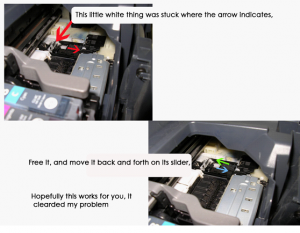 Root Ravine Pixma IP4300 Incorrectness 6A00, the tips from someone in printer installation allow with represent. Solotion failure 6A00 grow intructions in the show.
This methode also activity in Canon iP4200 and some individual says can be misused in Canon MP800(Absolute see image permit with descriptions)
Subscribe to:
Posts (Atom)