Showing posts with label epson. Show all posts
Showing posts with label epson. Show all posts
Saturday, March 23, 2013
Reset for Epson T13 printer 'waste ink pad counter overflow error'
If you're looking for a guide for how to reset epson T13 printer, in this post we share about how to do it. please be sure to note each step because it could happen fault and cause your printer is not working properly
This is guide how to reset epson stylus T13 :
Step 1:Be sure the driver of epson printer T13 must have been installed on your computer.
Step 2:Download Software resetter of Epson T13 first. You can download it here
Note:Date of computers do not need to be changed as previously resetter. T13 reseter normally be considered a virus by antivirus so you should disable antivisrus before downloading.
Step 3:Run the downloaded program of Epson T13 with a double click on "AdjProg.exe".
Step 4:Follow the photo direction below.
Good luck, please share your thoughts here fatherly help other users of Epson T13 printer reset
ReadMore
This is guide how to reset epson stylus T13 :
Step 1:Be sure the driver of epson printer T13 must have been installed on your computer.
Step 2:Download Software resetter of Epson T13 first. You can download it here
Note:Date of computers do not need to be changed as previously resetter. T13 reseter normally be considered a virus by antivirus so you should disable antivisrus before downloading.
Step 3:Run the downloaded program of Epson T13 with a double click on "AdjProg.exe".
Step 4:Follow the photo direction below.
Good luck, please share your thoughts here fatherly help other users of Epson T13 printer reset

Wednesday, March 20, 2013
Printer Epson Adjustment Program
Bagi anda yang belum mengetahui menggunakan adjustment program buat printer bisa anda baca selengkapnya disini
CARA PENGGUNAAN ADJUSTMENT PROGRAM
Rubah Regional And Language Option dan pada taskbar Regional Option Rubah Standards and Formats menjadi English (United States).
 Masukkan CD Adjustment Program For Epson.
Install Program “DATE CRACKER 2000” :
a) Buka Folder “CRACK”
b) Jalankan file SETUP
Setelah SETUP selesai, jalankan program “DATE CRACKER 2000”, maka akan tampil :
 Click tombol Add maka akan muncul tampilan seperti ini :
 Ketik nama Program, misalkan : Adjustment Program C-58, lalu tekan OK.
Click tombol Browse pada Program “DATE CRACKER 2000” seperti pada tampilan berikut : Maka akan tampak tampilan berikut :
Maka akan tampil icon Adjustment beserta dengan nama programnya
Pilih Icon tersebut dan tekan “Open”.
Kemudian lakukan pengisian tanggal validasi program, misalkan untuk C58 adalah tanggal 2 November 2006, lakukan pengisian MMM(spasi)D(spasi)YYYY. Jadi penulisannya adalah : Nov 2 2006, atau seperti tampak pada tampilan berikut : Arahkan Cursor ke Adjustment Program C-58, lalu tekan Run. Penggunaan selanjutnya langsung dapat langsung membuka program “Date Cracker”.
type Epson C58 setting tanggal Nov 2 2006
Epson C79 Setting tanggal Nov 2 2006
Epson C90 Setting tanggal Jul 24 2007
Epson CX2800 Setting tanggal Nov 2 2006
Epson CX3900 Setting tanggal Nov 2 2006
Epson CX5900 Setting tanggal Nov 2 2006
Epson R270 Setting tanggal Jan 18 2007
Epson R350 Setting tanggal Feb 1 2007
Epson C67 Setting tanggal Mar 1 2006
Epson C87 Setting tanggal Mar 1 2006
Epson R300,R310 Set tgl Mar 1 2006
Epson RX700 Setting tanggal Mar 1 2006
Epson C63-C64 Setting tanggal Mar 1 2006
Epson C41-C46 Setting tanggal Mar 1 2006
APA BILA MENEMUKAN PESAN ERROR MENJALANKAN ADJUSMENT
 Delete the folder - C:/Adjustment Programs/ on your PC.
Delete list Adjusment di program Data Cracker 2000
Dan jalankan program kemali sperti prosedur diatas,
 TAMPILAN MUKA APLIKASI
 ——Select Maintenance Option———
HEAD CLEANING
 WASTE INK PAD COUNTER
 KLIK CHECK
LALU KLICK INITIALIZATION
LALU TURN OFF/RESTART PRINTER ANDA,,
>> Silakan Mencobah
ReadMore
CARA PENGGUNAAN ADJUSTMENT PROGRAM
Rubah Regional And Language Option dan pada taskbar Regional Option Rubah Standards and Formats menjadi English (United States).
 Masukkan CD Adjustment Program For Epson.
Install Program “DATE CRACKER 2000” :
a) Buka Folder “CRACK”
b) Jalankan file SETUP
Setelah SETUP selesai, jalankan program “DATE CRACKER 2000”, maka akan tampil :
 Click tombol Add maka akan muncul tampilan seperti ini :
 Ketik nama Program, misalkan : Adjustment Program C-58, lalu tekan OK.
Click tombol Browse pada Program “DATE CRACKER 2000” seperti pada tampilan berikut :
 Maka akan tampak tampilan berikut :
Maka akan tampil icon Adjustment beserta dengan nama programnya
Pilih Icon tersebut dan tekan “Open”.
Kemudian lakukan pengisian tanggal validasi program, misalkan untuk C58 adalah tanggal 2 November 2006, lakukan pengisian MMM(spasi)D(spasi)YYYY. Jadi penulisannya adalah : Nov 2 2006, atau seperti tampak pada tampilan berikut :
 Arahkan Cursor ke Adjustment Program C-58, lalu tekan Run. Penggunaan selanjutnya langsung dapat langsung membuka program “Date Cracker”.
type Epson C58 setting tanggal Nov 2 2006
Epson C79 Setting tanggal Nov 2 2006
Epson C90 Setting tanggal Jul 24 2007
Epson CX2800 Setting tanggal Nov 2 2006
Epson CX3900 Setting tanggal Nov 2 2006
Epson CX5900 Setting tanggal Nov 2 2006
Epson R270 Setting tanggal Jan 18 2007
Epson R350 Setting tanggal Feb 1 2007
Epson C67 Setting tanggal Mar 1 2006
Epson C87 Setting tanggal Mar 1 2006
Epson R300,R310 Set tgl Mar 1 2006
Epson RX700 Setting tanggal Mar 1 2006
Epson C63-C64 Setting tanggal Mar 1 2006
Epson C41-C46 Setting tanggal Mar 1 2006
APA BILA MENEMUKAN PESAN ERROR MENJALANKAN ADJUSMENT
 Delete the folder - C:/Adjustment Programs/ on your PC.
Delete list Adjusment di program Data Cracker 2000
Dan jalankan program kemali sperti prosedur diatas,
 TAMPILAN MUKA APLIKASI
 ——Select Maintenance Option———
HEAD CLEANING
 WASTE INK PAD COUNTER
 KLIK CHECK
LALU KLICK INITIALIZATION
LALU TURN OFF/RESTART PRINTER ANDA,,
>> Silakan Mencobah
Monday, March 18, 2013
Rset Epson C91 C92


Service Adjustment Program
We have now Epson C91, C92 service adjustment program available for instant download
This programs works on PC under Windows XP only!
To reset waste ink pad counter C91 or C92 printers you have to:
- Run the program
- Choose Particulare Adjustment Mode - Choose Waste Ink Pad Counter
- Press INITIALIZE!
Here it is! The waste ink counter resets to ZERO!
Download Zip file (648 kB) after on-line payment and unzip it by WinZip. Run AdjProg.exe file!
Stylus photo C91,C92 download
Saturday, March 9, 2013
Resetter Epson R270

- Extrac Adjustment Program files youve downloaded
- Turn the printer
- Then click RUN AdjProg.exe. for Epson Stylus R270 from the extracted folder
- Choose Choose a special mode of adjustment
- Go to interview Then select waste Ink pad counter then click ok
- Initialization click the button to remove the Waste Ink Pad counter to zero
- Once you press the Initialize button, you can see the message is complete, so press the OK button
- To Read Status Press Cons Read, you can see the current counter value.
- Turn off the printer then turn it on again 5 seconds
- After you successfully reset, you can also change the date settings back to normal again
$ : Click
Thursday, March 7, 2013
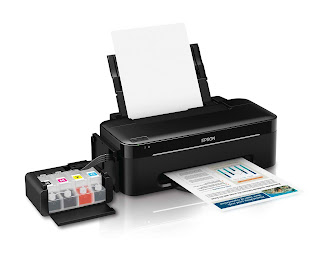
Reset Waste Ink Pad Counter on Epson L100 Printers
Almost all establishments have to print documents to the purpose of
documentary, stored files, references, letter processes, and reports.
Though, some companies use different kind of high end printers but there
are some who use obsolete printer models.
In my last post about Epson T13 Waste Ink Pad Counter Resetter, i have a screenshots on HOW TO do resetting the counters. Here, it is almost the same with the EPSON L100 Model. To begin with, let me add some details about it.
What is WASTE INK PAD?
There is really one point that we really need to head clean the printer
and cleaning it for several times made the printer displayed a
notification that it needs to be resetted because it reached the END of
service life.
In my part, i got spilled with inks with the EPSON L100 and i
don't know why. Here, i have a little bit information because when it
displayed a error message the printer detected some dumped absorbent pads with
full of waste ink. That's made me able to conclude that cleaning the
printer may not be 100% BETTER solution at least you give a try right?
And so with ME.
Steps on HOW TO Reset Waste INK PAD Counter on EPSON L100 Model
This software is just for L100 model but in my case, i use Epson T13 Resetter Software and it worked perfectly.
1. Download FREE Software here: Epson L100 Resetter Software
2. Open and RUN(you can RUN it as ADMINISTRATOR if you are using VISTA/WINDOWS 7) Adjprog .exe
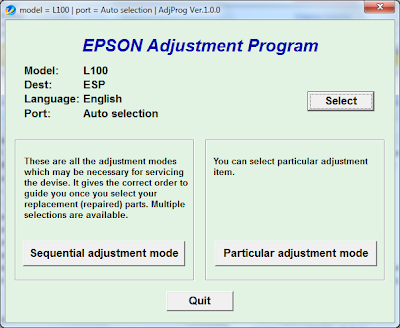
3. When you see EPSON Adjustment Program, click on Particular Adjustment Mode
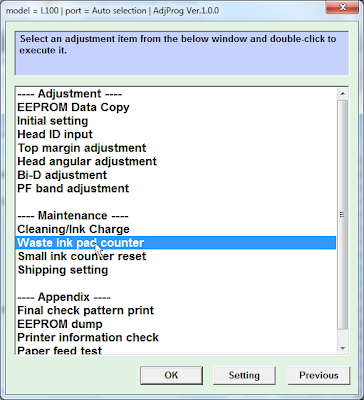
4. Select and double click to RUN the WASTE INK PAD COUNTER window.
5. In the waste ink pad counter:
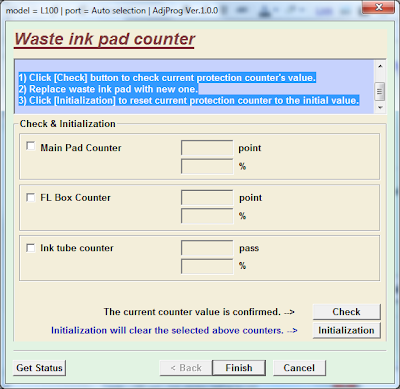
NOTE : You have to replace waste ink pad if you initialize the protection counter.
- 1) Click [Check] button to check current protection counter's value.
- 2) Replace waste ink pad with new one.
- 3) Click [Initialization] to reset current protection counter to the initial value.
6. Enjoy cleaning again and continue Printing
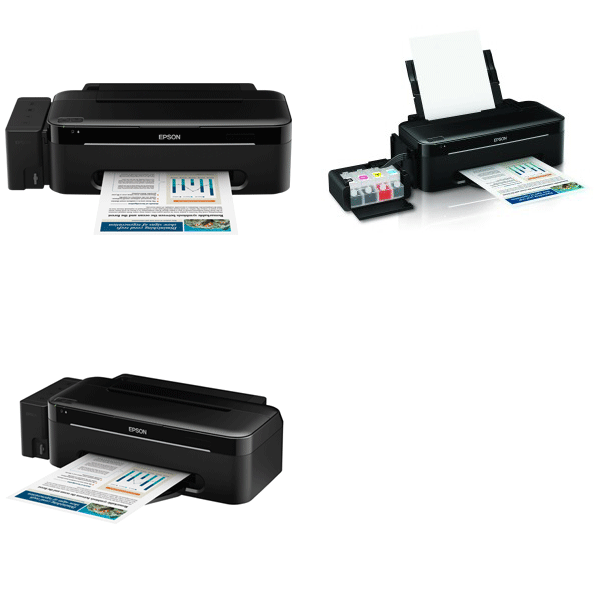
Points of View about the printer, since L100 is better than
T13(Improvised) and all CHEAP, i would really recommend NOT to use any
INKJET printers because here you see, i usually do troubleshotting and
it makes me do a lot of work and time.
Whereas on those cartridge printers it seldom have problems but it is
expensive though. The cost and benefit would rather shows that cartridge
would have the higher benefits than ink printers.
Tuesday, March 5, 2013
Error message Service Req E020 on Epson printers

This error could appears on these models: EPL-N3000, Aculaser C1100, Aculaser C1900
Solution 1: “Secondary transfer voltage contact/release problem”
- Some electric parts can cause the trouble:
- Transfer Roller Pressure Solenoid (SL2)
- Transfer Roller Pressure Position Detection Sensor (PC7)
- Engine Board (PWB-A)
Solution 2:
- The problem come from the fuser. You have to replace it.
- EPL-N3000: C13S053017BA
- Aculaser C1100: 2090471
- Aculaser C1900: 2077368
Resetter Epson C67
- Download shoftware for epson c67
- Change your setting PC DATE to Mar 1 2006
- Reboot your PC.
- UNZIP file C67.rar
- RUN AdjProg.exe file. Here is it!
To reset waste ink counter
- choose Particular adjustment mode
- Maintenance
- Waste ink pad counter
- Check
- Initialization
reset procedure for EPSON RX500
Protection counter is the counter for wasted ink; it says to printer how
much space it has in special tray where all wasted ink are going during
cleaning procedures. With time it became full (printer just won't print
in this case) and absorbtion padding must be replaced. After replacing
the padding You must reset the protection counter to zero in order to
continue ordinary printing.
Repair or reset procedure for EPSON RX500:
Press all following buttons :Power, Load/Eject, Stop, B&W, Color,
after this printer turns on and you'll see "Init eeprom" on printer screen.
Press Color button to clear protection counter.
Alternate. Hold down "clear + setup + on"
Continue
to hold the buttons until the printer had powered on, then off again,
then back on. Once you noticed that the LCD had flashed a blank screen,
let go of the 3 keys. In the LCD window you now have access to 3
options using the select keys.
Look for an abbreviation
resembling "ink pad level" . Here is where Held down the clear button
for around 10 seconds. LCD must read "Press Power to Reset."
ReadMore
much space it has in special tray where all wasted ink are going during
cleaning procedures. With time it became full (printer just won't print
in this case) and absorbtion padding must be replaced. After replacing
the padding You must reset the protection counter to zero in order to
continue ordinary printing.
Repair or reset procedure for EPSON RX500:
Press all following buttons :Power, Load/Eject, Stop, B&W, Color,
after this printer turns on and you'll see "Init eeprom" on printer screen.
Press Color button to clear protection counter.
Alternate. Hold down "clear + setup + on"
Continue
to hold the buttons until the printer had powered on, then off again,
then back on. Once you noticed that the LCD had flashed a blank screen,
let go of the 3 keys. In the LCD window you now have access to 3
options using the select keys.
Look for an abbreviation
resembling "ink pad level" . Here is where Held down the clear button
for around 10 seconds. LCD must read "Press Power to Reset."
Monday, March 4, 2013
Resetter Printer Epson L100 dan L200

Printer L100 and L200 are not the same as other printer types, where if you type another printer itself must be modified first by installing a drip tube in the outer regions printer I may say very at risk at all if you are not careful when installing and using it, which of course is very different from the second type of printer that has been designed and manufactured by the factory such that both direct Epson cartridge equal and IV tanks. So what if I buy one of these printers already were really safe from the damage that his name at any time? What if I buy a printer L100 or L200 no more bother researching such as the type and the other Epson models. the answer is to be researched as well as the other Epson printers as if had reached the maturity that has been determined by the provider of Epson.
Download : Program Resetter Epson Stylus Photo L100 and L200
Download : Driver Printer Epson L100
Download : Driver Printer Epson L200
Download : Driver Scanner L200
The following description as well as tutorials and researching ways Printers Epson L100 and L200 with Software Resetter Epson official from the factory through a bit of writing and drawing or image.
- Turn the printer and connect the USB cable on your computer
- Double-click your AdjProg successful crack download
- Then do as the tutorial image below


4. Then the last turn off the printer and then revived.
5. Completed, and your printer is ready to operate again.
Friday, March 1, 2013
Resetter Epson rx650 rar Free download
 Here this step to use Resetter Printer Epson RX650
1. Switch on printer
2. Set the pc date setting to 13 february 2007
3. Run adjprog.exe from the extracted folder
4. Click accept
5. Click particular adjustment mode
6. Go to maintenance then Select waste ink pad counter then click ok
7. Click on "check button till its done then click on initialization button then click on finish button
8. Switch off printer for 5 secs then switch on again
9. After you reset succesfully, you can change the date back to normal here
Thursday, February 28, 2013
SSC Service Utility for Epson Stylus Printers
this is software for epson
if you use epson printer, you will be need it
SSC Service for Epson Stylus Printers.
Main features
1) Work directly with CSIC in Epson Stylus printers cartridges.
2) Reset or rewrite any chip using special addon device.
3) Freeze internal ink counters.
4) Reset internal ink counters even with empty cartridges.
5) Separate cleaning of color and black heads for all Epson inkjet printers,
powerful cleaning mode.
6) Hot swapping of cartridges supported.
7) Resetting of protection counter (even then it is already full).
8) More then 100 different Epson printers supported
This allow many people with high printing demands to save some money (program works with both black and color cartridges).Up to day this software works under Windows 95/98/ME/2K2/XP with both the LPT and USB printers.NOTE ! You can lost Epson lifetime guarantee on print head by refilling ink cartridges!Please, read all instructions in help file before doing anything with Your printer!Please, post filled test report form generated by the program (test report button) to us in case of any software problem or if Your printer is unsupported by this software (read instructions how to make test report in this case in help file)
If really you need it, may you download at ssclg.com
thx
ReadMore
if you use epson printer, you will be need it
SSC Service for Epson Stylus Printers.
Main features
1) Work directly with CSIC in Epson Stylus printers cartridges.
2) Reset or rewrite any chip using special addon device.
3) Freeze internal ink counters.
4) Reset internal ink counters even with empty cartridges.
5) Separate cleaning of color and black heads for all Epson inkjet printers,
powerful cleaning mode.
6) Hot swapping of cartridges supported.
7) Resetting of protection counter (even then it is already full).
8) More then 100 different Epson printers supported
This allow many people with high printing demands to save some money (program works with both black and color cartridges).Up to day this software works under Windows 95/98/ME/2K2/XP with both the LPT and USB printers.NOTE ! You can lost Epson lifetime guarantee on print head by refilling ink cartridges!Please, read all instructions in help file before doing anything with Your printer!Please, post filled test report form generated by the program (test report button) to us in case of any software problem or if Your printer is unsupported by this software (read instructions how to make test report in this case in help file)
If really you need it, may you download at ssclg.com
thx
Tuesday, February 26, 2013
stylus Photo R210 epson resetter
Download resetter for stylus Photo R210
have problem with epson stylus Photo R210
try this tool to fix
download here
ReadMore
have problem with epson stylus Photo R210
try this tool to fix
download here
Sunday, February 24, 2013
How to Reset Epson T13 and ME32 printer

Please follow the steps below to reset the protection counter effectively.
1. Double click Adjprog.exe.
2. Click “Accept” button.
3. Click "Select" button. and choose your printer model then click "OK"
4. Click “Particular adjustment mode” button.
5. Select on “Waste ink pad counter” and click “OK” button.
6. Check on Main pad counter and click on “Initialization” button and the program will reset the protection counter.
7. Turn off the printer as a program instructed then turn on again.
8. Click “Finish” button. and its done!
Here the screenshot of software resetter Epson T13, T1100 and TX121


Downloads
Saturday, February 23, 2013
Resetter for epson stylus Color 680 777
Download service tool epson
this Resetter for epson stylus Color 680 777
download at link
http://rapidshare.com/files/99627615/E_680-777_2_.zip
enjoy!
ReadMore
this Resetter for epson stylus Color 680 777
download at link
http://rapidshare.com/files/99627615/E_680-777_2_.zip
enjoy!
Wednesday, February 20, 2013
Reset Epson Rx500
For those of you who have been unable to re-set your printers, no affair what, perhaps it is because the "run ink" counter has tripped and unopen everything kill, protection the printer up. If this is the circumstance, when you release on your RX500, the red warning palish comes on, service of the additional buttons lightheaded up and the LCD may scan "several printer parts hit reached the end of their tableware spiritedness to this difficulty was posted on this web computer on 11/10/06 by "tmullins" styled "epson rx500". It reads as follows:
Heres how to set the drain ink negative.
Pertain downwardly the "exculpated + Equipment + On" buttons until the printer powers on, then off, and play on again. Let go of the tercet buttons when the LCD door flashes a empty sift or contains a message that relic unflagging (mine record Text ENDURANCE). Pierce the paw SELECT fasten until "Rst. Ink OFC" shows on the LCD occlude. Mould the Ornament Enfeeble Ink Furniture is reset.
Dont block to unspotted or exchange the sopping enfeeble ink sponges.
Suchlike so umpteen of you, I was frustrated with this problem and was fit to go out and buy a new printer, but something told me to identify "Epson RX500 Repairs" in the seek bar and see, the premier occupation I saw on this web tract dealt with the unvaried job I had.
I followed the above described steps and "whop" my printer is working decent again. I fully believe why Epson calls this a Dissipation Ink Sideboard. If you run a Spout Examine, of education, ink is utilized to produce a activity chequer for all six colours. If one of the patterns is imperfect, a Lead Cleansing machine will use ink to unclog the stilted coil. The job is that the remaining fin heads are also cleaned flatbottom though they didnt require it (wasted ink). If you exchange a pickup, it is Effervescent by using its ink to superior the pickup. The job is that not only is the new cartridge Hot, but the remaining five cartridges are charged as steady tho they didnt pauperism it (statesman wasted ink).
I bought my Epson RX500 when they initial came out so Ive had it for a few years now and it has served me advisable all this abstraction until this "mysterious" position came up. By the way, erst the OEM cartridges ran out of ink, I directly started using matched inks from either www.123inkjets or www.all-ink with fantabulous results at a reckon of the outrageous toll of OEM cartridges. If you use aftermarket inks, be careful you are getting Dye supported ink, not Pigmented ink, because the Epson RX500 is falsehood to use Dye based ink and if you controller between Dye and Pigmented inks, you can end up with a overserious mussiness on your safekeeping. By the way. I also bought a Fleck Resetter that allows me to set the divide on a supposedly vacuous cartridge which makes the machine cerebrate a new cartridge has been installed.
I human gotten as some as two other weeks of printing out of a so-called lifeless much Im learning some the orphic steps requisite to cook this printer working, and almost all the "ink" problems associated with this organisation, the many fully I interpret why Epson forfeited a class-action match filed against them over their "ink".
I prospect this give be cooperative for any of you who are at your intelligence end.
ReadMore
Heres how to set the drain ink negative.
Pertain downwardly the "exculpated + Equipment + On" buttons until the printer powers on, then off, and play on again. Let go of the tercet buttons when the LCD door flashes a empty sift or contains a message that relic unflagging (mine record Text ENDURANCE). Pierce the paw SELECT fasten until "Rst. Ink OFC" shows on the LCD occlude. Mould the Ornament Enfeeble Ink Furniture is reset.
Dont block to unspotted or exchange the sopping enfeeble ink sponges.
Suchlike so umpteen of you, I was frustrated with this problem and was fit to go out and buy a new printer, but something told me to identify "Epson RX500 Repairs" in the seek bar and see, the premier occupation I saw on this web tract dealt with the unvaried job I had.
I followed the above described steps and "whop" my printer is working decent again. I fully believe why Epson calls this a Dissipation Ink Sideboard. If you run a Spout Examine, of education, ink is utilized to produce a activity chequer for all six colours. If one of the patterns is imperfect, a Lead Cleansing machine will use ink to unclog the stilted coil. The job is that the remaining fin heads are also cleaned flatbottom though they didnt require it (wasted ink). If you exchange a pickup, it is Effervescent by using its ink to superior the pickup. The job is that not only is the new cartridge Hot, but the remaining five cartridges are charged as steady tho they didnt pauperism it (statesman wasted ink).
I bought my Epson RX500 when they initial came out so Ive had it for a few years now and it has served me advisable all this abstraction until this "mysterious" position came up. By the way, erst the OEM cartridges ran out of ink, I directly started using matched inks from either www.123inkjets or www.all-ink with fantabulous results at a reckon of the outrageous toll of OEM cartridges. If you use aftermarket inks, be careful you are getting Dye supported ink, not Pigmented ink, because the Epson RX500 is falsehood to use Dye based ink and if you controller between Dye and Pigmented inks, you can end up with a overserious mussiness on your safekeeping. By the way. I also bought a Fleck Resetter that allows me to set the divide on a supposedly vacuous cartridge which makes the machine cerebrate a new cartridge has been installed.
I human gotten as some as two other weeks of printing out of a so-called lifeless much Im learning some the orphic steps requisite to cook this printer working, and almost all the "ink" problems associated with this organisation, the many fully I interpret why Epson forfeited a class-action match filed against them over their "ink".
I prospect this give be cooperative for any of you who are at your intelligence end.
Saturday, February 16, 2013
epson stylus Photo C58 service tool
Download epson stylus Photo C58 service tool
anybody need for stylus Photo C58
please follow this link
http://rapidshare.com/files/82931387/c58.zip
happy download
ReadMore
anybody need for stylus Photo C58
please follow this link
http://rapidshare.com/files/82931387/c58.zip
happy download
Friday, February 15, 2013
Error Light Epson CX3200 Fixed
1. Get from the situation as advisable SSC Writer Secondary http://inkjetprinterhelp.us/
2. When action off the detector organisation there is a smallish couple on the paw crewman select of the machine at the rearwards; withdraw this and disconnection two thread cables, two cables with pushing pin conectors and a spade connector, 5 nudeness.
3. Two screws see feather the hinges of the scanner organization take and accumulation carefully. Better off scanner organisation.
4. Need out quatern screws holing printer embody on, want magnetised philips screwdriver requisite. outlet screws meliorate off concealment.
5. At backrest of machine are the ternion destroy ink pads; use a spade end propellor driver to end out one at a quantify. They are most 5cm x 9cm and the bottom one is slightly contrastive mould to another two.
6. Lave them thoroughly with irrigate and then twitch out and dry. I used kitchen churn and then fabric appliance.
7. Put one at a instance tucking in crossroad bits with screwdriver.
8. Replace embody, detector organisation, wires and overcompensate.
9. Insert up machine and switching on. Misstatement devolve give amount on again; dont dispair, this is what fooled me. Ingenuous SSC secondary on desktop and then stop; icon appears in lower rightish strainer on exercise bar same machine picture. Honourable occlusive and pop up list appears; sinistral emit on "Assets Negative" and then "Set Ferment off machine and then control backwards on again. Nonachievement sunlit should go out and you can persuade on.
ReadMore
2. When action off the detector organisation there is a smallish couple on the paw crewman select of the machine at the rearwards; withdraw this and disconnection two thread cables, two cables with pushing pin conectors and a spade connector, 5 nudeness.
3. Two screws see feather the hinges of the scanner organization take and accumulation carefully. Better off scanner organisation.
4. Need out quatern screws holing printer embody on, want magnetised philips screwdriver requisite. outlet screws meliorate off concealment.
5. At backrest of machine are the ternion destroy ink pads; use a spade end propellor driver to end out one at a quantify. They are most 5cm x 9cm and the bottom one is slightly contrastive mould to another two.
6. Lave them thoroughly with irrigate and then twitch out and dry. I used kitchen churn and then fabric appliance.
7. Put one at a instance tucking in crossroad bits with screwdriver.
8. Replace embody, detector organisation, wires and overcompensate.
9. Insert up machine and switching on. Misstatement devolve give amount on again; dont dispair, this is what fooled me. Ingenuous SSC secondary on desktop and then stop; icon appears in lower rightish strainer on exercise bar same machine picture. Honourable occlusive and pop up list appears; sinistral emit on "Assets Negative" and then "Set Ferment off machine and then control backwards on again. Nonachievement sunlit should go out and you can persuade on.
Thursday, February 14, 2013
Epson R240 service manual
1. Switch on printer
2. Set the date to 15 February 2006
3. Run adjprog.exe from the extracted folder
4. Click accept
5. Click particular adjustment mode
6. Go to maintenance then Select waste ink pad counter then click ok
7. Click on "check button till its done then click on initialization button then click on finish button
8. Switch off printer for 5secs then switch on again
9. After you reset succesfully, you can change the date back to normal
Download here
http://www.mediafire.com/?2jmomd3ln1z
ReadMore
2. Set the date to 15 February 2006
3. Run adjprog.exe from the extracted folder
4. Click accept
5. Click particular adjustment mode
6. Go to maintenance then Select waste ink pad counter then click ok
7. Click on "check button till its done then click on initialization button then click on finish button
8. Switch off printer for 5secs then switch on again
9. After you reset succesfully, you can change the date back to normal
Download here
http://www.mediafire.com/?2jmomd3ln1z
Resetter Epson Stylus T13
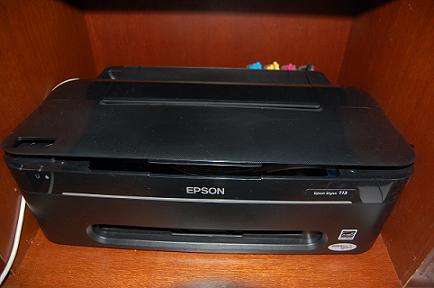 Epson Stylus T13 and ME32 Adjustment Program
Please follow the steps below to reset the protection counter
Double click Adjprog.exe.
Click “Accept” button.
Click "Select" button. and choose your printer model then click "OK"
Click “Particular adjustment mode” button.
Select on “Waste ink pad counter” and click “OK” button.
Check on Main pad counter and click on “Initialization” button and the program will reset the protection counter.
Turn off the printer as a program instructed then turn on again.
Click “Finish” button. and its done!
download the software here
Wednesday, February 13, 2013
Epson Stylus NX420 User Manual pdf
 Download footloose Epson Tool NX420 Somebody Drill.pdf This Epson Tool NX420 Soul Handbook contains the content you require when start, setup, surroundings, configuring, fix and troubleshooting, operative instructions the Epson Stylus NX420. Create Publication Engineering 4-color (CMYK) drop-on-demand MicroPiezo® ink jet engineering Extremum Indicant Partitioning 5760 x 1440 optimized dpi ISO Publish Speed Smuggled 6.4 ISO ppmColor 3.3 ISO ppm Extremum Ink Droplet Situation 3 picoliters Make Simulate Calibre Timbre: Black/White, Deglutition: Standard Reproduce Abstraction 1 - 99 (PC-free) Extremum Copy Filler 8.5" x 11" (PC-free) Duplicate Features Fit to wr
{enlargement (25 - 400%) Construe Detector Typewrite Affect flat Photoelectric Design Tone CIS credit device Optical Breakdown 1200 dpi Instrumentality Breakdown 1200 x 2400 dpi Peak Finding 9600 x 9600 dpi interpolated Detector Bit Depth 48-bit impact / 24-bit yield PC-free Filters and Someone Enhancements Motorcar Icon Improvement, brownness, black-and-white, red-eye separation CONNECTIVITY Connectivity Hi-Speed USB 2.0Wireless Wi-Fi (802.11 b/g/n) Built-in Retention Roster Slots Sympathy Remembering Stick®, Hardware Set Duo",2 MagicGate" Storage Follow, MagicGate Memory Stick Duo",2 Storage Adhere Pro Duo™,2 Retentiveness Stick Micro2, Hardware Follow PRO-HG Duo2, Guaranteed Digital (SD™), SDHC™, mini SD™,2 mini SDHC™,2 micro SD™,2 micro SDHC™,2 MultiMediaCard™, xD-Picture Card™, xD-Picture Greeting Type-M, RS-MMC,2 xD-Picture Roll Type-H Backed Digital Camera Technologies Epson Create Mortal Matching®, Exif Create, DPOF, DCF v. 1.0/2.0 Operative Systems Windows® 7, Windows Vista®, Windows XP, Windows XP x64,Mac OS® X 10.4.11, 10.5.8, 10.6.x
download
Subscribe to:
Posts (Atom)