Showing posts with label resetter. Show all posts
Showing posts with label resetter. Show all posts
Thursday, March 21, 2013
Resetter Canon i850 i950 S600

Start with the printer OFF
1. Hold down RESUME and then hold down POWER
2. Release RESUME
3. Press RESUME twice, then release POWER
4. Let green light blink until printer is done futzing
Select function with RESUME press POWER to execute:
presses - light color - function
Number of presses - light color - function
0 presses - green - Test print (or exit service mode on i960)
1 press - orange - EEPROM info print (plus grid nozzle diagnostic on i960)
2 presses - green - EEPROM initialize
3 presses - orange - Reset waste ink counter

Tuesday, March 19, 2013
Resetter Code Canon BJC 1000 Serie

1. Remove Cartridge
2. Unplug the AC Power Cord
3. Hold down the RESUME button
4. Release RESUME after plugging in the AC Power cord.
5. Press the RESUME once within 5 seconds and release the RESUME .
6. Press and HOLD RESUME for two seconds or more and release it.
7. Press and HOLD RESUME for two seconds or more and release it.
8. Unplug AC Power Cord to set data.
Saturday, March 9, 2013
Resetter Epson R270

- Extrac Adjustment Program files youve downloaded
- Turn the printer
- Then click RUN AdjProg.exe. for Epson Stylus R270 from the extracted folder
- Choose Choose a special mode of adjustment
- Go to interview Then select waste Ink pad counter then click ok
- Initialization click the button to remove the Waste Ink Pad counter to zero
- Once you press the Initialize button, you can see the message is complete, so press the OK button
- To Read Status Press Cons Read, you can see the current counter value.
- Turn off the printer then turn it on again 5 seconds
- After you successfully reset, you can also change the date settings back to normal again
$ : Click
Tuesday, March 5, 2013
Resetter Epson C67
- Download shoftware for epson c67
- Change your setting PC DATE to Mar 1 2006
- Reboot your PC.
- UNZIP file C67.rar
- RUN AdjProg.exe file. Here is it!
To reset waste ink counter
- choose Particular adjustment mode
- Maintenance
- Waste ink pad counter
- Check
- Initialization
Friday, March 1, 2013
Resetter Epson rx650 rar Free download
 Here this step to use Resetter Printer Epson RX650
1. Switch on printer
2. Set the pc date setting to 13 february 2007
3. Run adjprog.exe from the extracted folder
4. Click accept
5. Click particular adjustment mode
6. Go to maintenance then Select waste ink pad counter then click ok
7. Click on "check button till its done then click on initialization button then click on finish button
8. Switch off printer for 5 secs then switch on again
9. After you reset succesfully, you can change the date back to normal here
Tuesday, February 26, 2013
stylus Photo R210 epson resetter
Download resetter for stylus Photo R210
have problem with epson stylus Photo R210
try this tool to fix
download here
ReadMore
have problem with epson stylus Photo R210
try this tool to fix
download here
Saturday, February 23, 2013
Resetter for epson stylus Color 680 777
Download service tool epson
this Resetter for epson stylus Color 680 777
download at link
http://rapidshare.com/files/99627615/E_680-777_2_.zip
enjoy!
ReadMore
this Resetter for epson stylus Color 680 777
download at link
http://rapidshare.com/files/99627615/E_680-777_2_.zip
enjoy!
Tuesday, February 19, 2013
Canon Printers reset with Software Resetter
Mostly, Ravine resetter programs change twin resetting work except for any models. So that fortunate resetting canon printers using writer ride all enter attributes of software resetter should not be feature exclusive and dont run the software from CD. There are two variation of pervading way for ravine printer that is with enclosure announcement add and do not jazz Interlace Activity fix.
For resetter with Embrace Give secure (launch internal the possible file)
1. Run generaltool.exe or the application or executable file.
2. Select USB port of the printer to be reset.
3. Click lock release button.
4. IN Select Destination option, select the printer model.
5. In Test Print option, select EEPROM clear.
6. Prepare a paper and then click test pattern 1 under Test Print option.
7. Turn off the printer and turn on again.
For resetter which do not have Lock Release button
Run generaltool.exe or the program or workable line.
Select USB side of the printer to be set.
In Select Destination deciding, superior the printer mold.
In Try Create deciding, superior EEPROM unobstructed.
Modify a theme and then stop endeavour ornament 1 under Judge Exposure option.
windup it
ReadMore
For resetter with Embrace Give secure (launch internal the possible file)
1. Run generaltool.exe or the application or executable file.
2. Select USB port of the printer to be reset.
3. Click lock release button.
4. IN Select Destination option, select the printer model.
5. In Test Print option, select EEPROM clear.
6. Prepare a paper and then click test pattern 1 under Test Print option.
7. Turn off the printer and turn on again.
For resetter which do not have Lock Release button
Run generaltool.exe or the program or workable line.
Select USB side of the printer to be set.
In Select Destination deciding, superior the printer mold.
In Try Create deciding, superior EEPROM unobstructed.
Modify a theme and then stop endeavour ornament 1 under Judge Exposure option.
windup it
Thursday, February 14, 2013
Resetter Epson Stylus T13
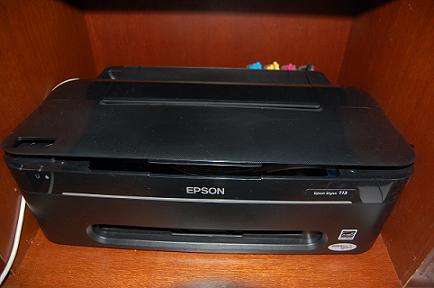 Epson Stylus T13 and ME32 Adjustment Program
Please follow the steps below to reset the protection counter
Double click Adjprog.exe.
Click “Accept” button.
Click "Select" button. and choose your printer model then click "OK"
Click “Particular adjustment mode” button.
Select on “Waste ink pad counter” and click “OK” button.
Check on Main pad counter and click on “Initialization” button and the program will reset the protection counter.
Turn off the printer as a program instructed then turn on again.
Click “Finish” button. and its done!
download the software here
Saturday, February 9, 2013
Download resetter stylus photo C80 70
Here a Tool for reset stylus photo C80 70
if you like it please post some coment
http://rapidshare.com/files/99627885/Epson_Adjusment_Program_80_70_Series.zip
Good luck.
ReadMore
if you like it please post some coment
http://rapidshare.com/files/99627885/Epson_Adjusment_Program_80_70_Series.zip
Good luck.
Friday, February 8, 2013
Download resetter for iP 2500
,Download resetter for iP 2500
any one have problem with canon ip 2500?
download resetter at http://www.startcopy.ru/repair/files/ip1100.zip
good luck friend..
ReadMore
any one have problem with canon ip 2500?
download resetter at http://www.startcopy.ru/repair/files/ip1100.zip
good luck friend..
Subscribe to:
Posts (Atom)